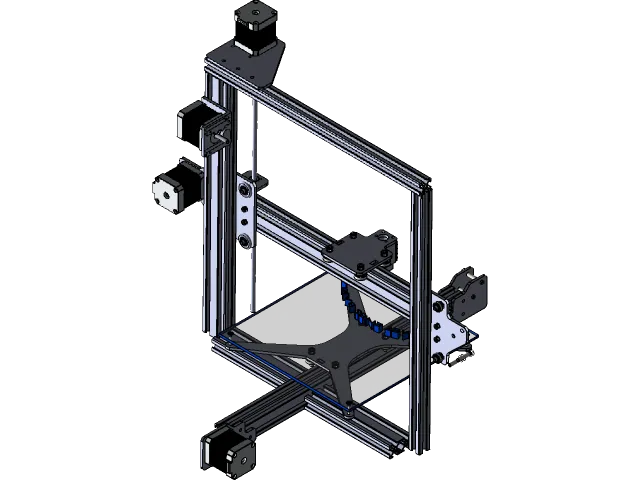
Tevo Tarantula RS: 5 Must-Know Tips
The Tevo Tarantula RS is a popular 3D printer, and while it offers great value, mastering it takes a bit of know-how. This guide provides five essential tips to help you get the most out of your Tevo Tarantula RS. From bed leveling to filament selection and print settings, these insights will enhance your 3D printing experience. By following these tips, you’ll be well on your way to producing high-quality prints and avoiding common pitfalls that beginners often face. Let’s dive into the essential knowledge to ensure your success with this 3D printer and bring your ideas to life.
Leveling the Bed
Bed leveling is arguably the most critical aspect of achieving successful 3D prints. A properly leveled bed ensures that your first layer adheres correctly, preventing warping and other print defects. This step establishes the foundation for the entire print, and its accuracy directly impacts the quality and reliability of your finished product. Without a level bed, the nozzle might be too close or too far from the build plate, leading to poor adhesion or a clogged nozzle. Take your time and get this right; it’s the cornerstone of all good prints, saving time and material in the long run.
Why Bed Leveling is Crucial

Proper bed leveling is crucial for ensuring the first layer of your 3D print adheres correctly to the print bed. This adhesion is fundamental for the entire print. If the first layer doesn’t stick, the print will likely fail, leading to wasted filament and time. Moreover, an uneven bed can cause the nozzle to be too close or too far from the print surface in different areas, resulting in inconsistent layer adhesion, warping, and other print defects. The Tevo Tarantula RS, like other 3D printers, relies on a precisely leveled bed for optimal print quality and reliability. A properly leveled bed ensures that the first layer adheres uniformly, resulting in a solid foundation for the rest of your print. This precision minimizes warping, ensures dimensional accuracy, and enhances the overall success rate of your projects. Without it, you’ll be battling failed prints and frustration.
Leveling Techniques and Tools
There are several methods for leveling the bed on your Tevo Tarantula RS. The most common method involves using the four leveling screws located on the corners of the print bed. You’ll need a piece of paper to act as a feeler gauge. Heat up the bed and nozzle to the recommended printing temperatures for your chosen filament. Move the nozzle to each corner and adjust the bed leveling screws until the nozzle just lightly grips the paper as you slide it underneath. Modern printers sometimes have an auto-leveling function using sensors. For the Tevo Tarantula RS, manually leveling is crucial. Practice makes perfect; it’s a skill that will improve over time. Always double-check the level before starting a print. Using a bed-leveling probe can automate this process. Calibrating the probe and setting the Z-offset correctly are key to its effectiveness. The right approach will improve the quality of your prints.
Understanding Filament Types
Choosing the right filament is essential for successful 3D printing with your Tevo Tarantula RS. Different filaments have unique properties and require specific settings. The most popular filaments are PLA and ABS, each offering distinct advantages and disadvantages. PLA (Polylactic Acid) is a beginner-friendly material known for its ease of use and low warping. ABS (Acrylonitrile Butadiene Styrene) is a more robust material suitable for functional parts, but it can be more challenging to print due to its higher printing temperatures and tendency to warp. The choice of filament significantly impacts the final print quality. Selecting the suitable filament depends on the project’s needs, considering factors like strength, flexibility, and temperature resistance. Make sure to explore different filament types to find the best fit for your projects.
PLA Filament Properties

PLA is an excellent starting point for 3D printing with the Tevo Tarantula RS. It is derived from renewable resources like cornstarch, making it a more eco-friendly option compared to ABS. PLA is known for its low printing temperature, typically around 190-220°C, and minimal warping, making it easier to work with. It produces less odor during printing compared to ABS. PLA’s ease of use and wide range of colors make it ideal for beginners and for printing prototypes and decorative items. PLA also has a glossy finish. While PLA is not as strong or heat-resistant as ABS, it is perfect for many applications. Always store PLA filament in a dry, cool place to prevent moisture absorption, which can negatively affect print quality. Experiment with different brands and settings to optimize your PLA prints.
ABS Filament Properties
ABS is a more robust and durable material than PLA, making it suitable for functional parts and items that need to withstand higher temperatures. ABS requires a higher printing temperature, typically around 220-250°C, and a heated bed, which can be challenging for beginners. It is prone to warping, so it’s crucial to enclose the printer to maintain a consistent temperature and reduce warping. ABS produces fumes during printing, so good ventilation is important. Despite its challenges, ABS offers superior strength, flexibility, and heat resistance, making it ideal for mechanical parts, enclosures, and other applications that demand durability. To print ABS successfully with your Tevo Tarantula RS, you must use a heated bed and ensure proper ventilation. Consider using an enclosure to reduce warping and improve print quality. ABS requires slightly more advanced printing skills.
Tuning Print Settings
Optimizing your print settings is critical for achieving high-quality prints with your Tevo Tarantula RS. Key settings to adjust include temperature, print speed, and layer height. The ideal settings will vary depending on the filament type, the size and complexity of your print, and the environment you are printing in. Experimentation and fine-tuning are key to finding the perfect settings for your projects. Start with the recommended settings for your chosen filament and gradually adjust them until you achieve the desired results. Keep a record of your settings so you can repeat successful prints. Print settings directly influence the quality, accuracy, and success rate of your 3D prints. Fine-tuning these settings is essential for producing high-quality prints.
Adjusting Temperature
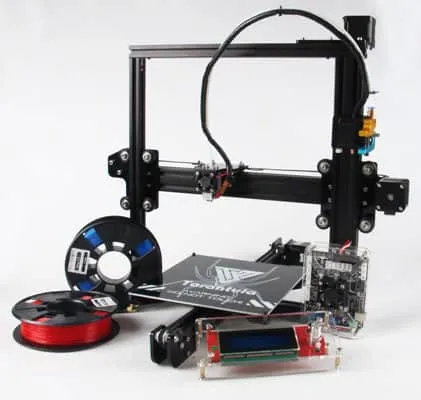
Temperature is a critical print setting that greatly influences the quality of your 3D prints. The ideal printing temperature varies depending on the filament. PLA typically prints between 190-220°C, while ABS requires a higher temperature, often ranging from 220-250°C. Setting the temperature too low can result in under-extrusion and poor layer adhesion. Setting it too high can lead to stringing, oozing, and print deformation. Always refer to the filament manufacturer’s recommendations for the optimal printing temperature. Fine-tune the temperature in small increments to find the sweet spot. For PLA, start at the lower end of the recommended range and gradually increase the temperature until the layers bond well. With ABS, higher temperatures are needed to achieve a good layer bond. Monitor your prints closely and adjust the temperature to achieve the best results. Temperature directly affects the filament’s flow and bonding properties.
Setting Print Speed
Print speed greatly affects the quality and speed of your 3D prints with your Tevo Tarantula RS. Printing too fast can lead to layer shifting, poor layer adhesion, and a rough surface finish. Conversely, printing too slow can increase printing time. The ideal print speed depends on your filament type, the size and complexity of the model, and the printer’s capabilities. Start with a slower print speed, such as 40-60 mm/s, and gradually increase it while monitoring the print quality. For detailed prints, a slower speed may be necessary to ensure fine details are rendered accurately. For larger, less detailed prints, you can increase the speed without sacrificing quality. Faster speeds can be used for the infill. Balancing print speed and quality can optimize print time. Experiment with different speeds to find the optimal balance for your projects.
Optimizing First Layer
A successful first layer is the foundation for a successful 3D print. It is crucial for good adhesion. Proper first-layer adhesion minimizes warping and ensures that the print adheres to the bed throughout the printing process. A poorly laid first layer can lead to print failure, which can be frustrating and wasteful of filament and time. Pay careful attention to the first layer during the printing process. It must adhere properly to the build plate. Ensuring a good first layer involves several factors, including bed leveling, nozzle height, and bed temperature. Fine-tune these settings to ensure the best results, as these will affect the final quality of your prints. This layer acts as the base for the subsequent layers. A well-executed first layer guarantees the print’s dimensional accuracy and stability. Many print issues originate from this initial layer.
Importance of First Layer Adhesion

First layer adhesion is absolutely vital for successful 3D printing. It refers to how well the initial layer of filament sticks to the print bed. If the first layer doesn’t adhere correctly, the entire print will likely fail. Good adhesion prevents the print from warping or detaching from the bed during printing. The Tevo Tarantula RS is highly dependent on the first layer for overall success. Several factors influence first-layer adhesion, including a properly leveled bed, the correct nozzle height, the appropriate bed temperature, and the use of adhesives, if needed. Achieving good first-layer adhesion is crucial for a reliable and successful printing experience. Without a well-adhered first layer, the rest of the print will be compromised, leading to a waste of time, filament, and effort. Addressing adhesion issues is often the first step when troubleshooting print problems.
Troubleshooting First Layer Issues
If you experience first-layer adhesion issues with your Tevo Tarantula RS, there are several troubleshooting steps you can take. First, ensure your bed is level. Re-level the bed and double-check it with the paper method. Second, adjust the nozzle height. The nozzle should be close enough to the bed for the filament to adhere but not so close that it scrapes the bed. Third, check the bed temperature. Use the recommended temperature for your filament. Fourth, consider using an adhesive. Glue stick or painter’s tape can improve adhesion. Fifth, clean the bed surface with isopropyl alcohol to remove any oils or debris. Sixth, slow down the first-layer print speed. This allows the filament to adhere more effectively. Inspect the first layer closely during the printing process, making any necessary adjustments. Patience and experimentation are key to resolving first-layer problems. Properly addressing these issues will significantly improve your printing success and save you from frustration.
Maintaining Your Tevo Tarantula RS
Regular maintenance is essential for keeping your Tevo Tarantula RS in top condition and ensuring reliable prints. Proper maintenance extends the life of your printer, improves its performance, and prevents unexpected breakdowns. Maintenance involves a range of tasks, from cleaning the printer to lubricating moving parts and checking for wear and tear. Developing a maintenance schedule can help you stay on top of these tasks. By taking good care of your printer, you can enjoy a smoother 3D printing experience and achieve better results. Regular maintenance prevents common problems, improves print quality, and prolongs the life of your 3D printer.
Regular Maintenance Tasks

Regular maintenance tasks for the Tevo Tarantula RS include cleaning, lubrication, and inspection. Always clean the print bed before and after each print. Use isopropyl alcohol to remove any residue. Lubricate the moving parts, such as the linear rods and lead screws, with a suitable lubricant. Check the belts for tension and wear, and tighten or replace them as needed. Inspect the nozzle and hot end for clogs or damage. Tighten any loose screws or connections. Keep the printer environment clean and free of dust and debris. Regularly check the firmware and update it as needed. Regular maintenance prevents unexpected breakdowns. These steps will ensure that your printer operates at its best. A well-maintained 3D printer is a more reliable 3D printer. Make it a routine part of your printing process.
Identifying and Fixing Common Issues
Familiarizing yourself with common issues and their solutions is beneficial for maintaining your Tevo Tarantula RS. Common problems include nozzle clogs, bed leveling issues, and filament jams. If your nozzle clogs, try a cold pull, using a cleaning filament, or replacing the nozzle. If your bed is not leveling, carefully re-level it. Filament jams can be caused by a variety of factors. Inspect the filament path for obstructions. Check the extruder gear. Temperature can also cause issues. The most important thing is to troubleshoot effectively. Know how to diagnose and address problems. Regularly inspect the printer for any signs of wear. If you experience layer shifting, check the belt tension and ensure the stepper motor drivers are functioning correctly. Regular inspections and problem-solving skills are essential for keeping your printer running smoothly and maximizing print quality.